Confident capture: One free download
Make it easy for everyone in your organization to digitize, capture, and index data with a simple interface and superior automation.

Make it easy for everyone in your organization to digitize, capture, and index data with a simple interface and superior automation.
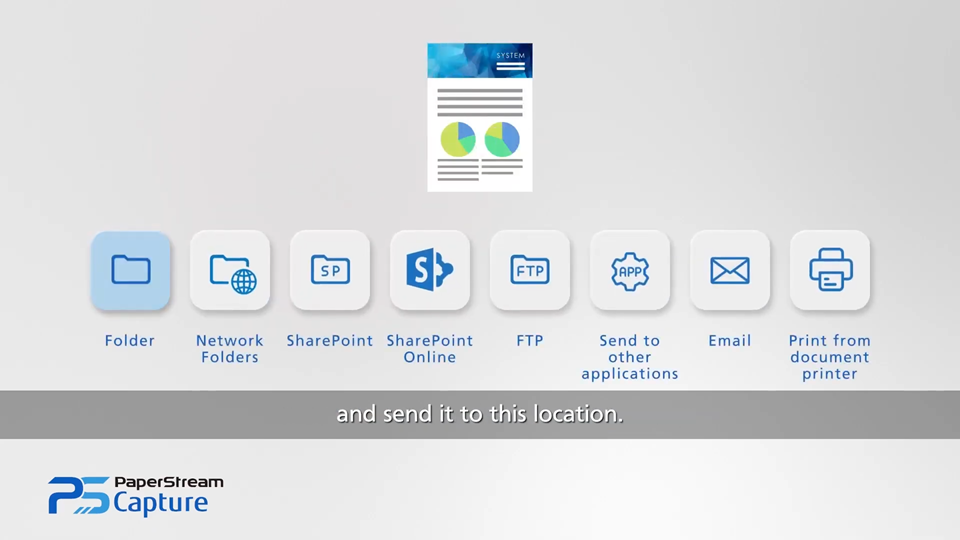

PaperStream Capture offers default settings for out-of-the-box success. Advanced users can configure customized profiles.

Use the AIQC function to choose ideal images for frictionless data capture and smoother workflows.

Searchable PDFs? Simple. Scan, sort, separate and save documents in your chosen type of file, to your selected application.
No, however our superior imaging and innovative feeder technology are the best fit for scanning cards safely at high velocity. No other scanners on the market will yield the quality that you will get from scanning with a Ricoh scanner. The contactless ScanSnap SV600 scanner or a Ricoh flatbed/feeder scanner (like the fi-8250), in particular, is optimized for protecting valuable cards against potential damage.
Our experts can help, please fill out the Speak to an Expert form above and we will will help you. If you’re passionate about the quality of your cards, we recommend you only buy new scanners. Used scanners (such as from eBay) may not come with a warranty, up-to-date software, or provide you the assurance they won’t cause quality issues with your images.
We recommend scanning using the included ScanSnap Home software. Using the “Photo Profile” will give you the best image. Additionally, scan in a room with limited light in order to reduce glare.
Ricoh scanners support a wide variety of cards including sports cards, gaming, and Pokemon to name a few!
1. Create a profile. This is especially helpful for scanning cardboard cards vs Chrome or Prism reflective-style cards and if you have multiple scanners.
2. Turn on Continuous Scan mode.
3. Turn off Edge Correction.
Yes. These types of cards can be scanned through a feeder. However, due to the high levels of reflectivity from these cards, we recommend using a flatbed model, such as fi-8250, fi-8270 or SV600 scanner. To further improve scanning of Prism or Chrome cards using software enhancements, follow these steps:
1. In PaperStream, click Advanced settings.
2. Click the Image section and select SRGB output. Selecting this option will enhance the reflective portion of the card.
For optimal image quality for Chrome and Prism cards, you can create a scanning profile in PaperStream IP based on settings shown in the image below.
Example images below of a Prism card scanned by a fi-8170 scanner:
Example images below of a Chrome card scanned by a fi-8170 scanner:
1. In PaperStream, click Advanced settings.
2. Click the Image section and select SRGB output. Selecting this option will enhance the reflective portion of the card.
Yes, we provide drivers for Mac users for some of our sheet fed scanners based on the current Mac operating systems. Our Flatbed scanners do not support Mac at this time. Although PaperStream software is not available for Mac users, you can use “Mac Preview” to scan, or look at our 3rd party software vendors.
We offer free technical assistance by calling 1-800-626-4686. When you reach an agent, ask for someone who has been trained in trading card support. They can help you set up the scanner, configure your profiles and solve any technical issues you may have.
This occurrence means that "Hole Punch Removal" mode is on in the software driver. Turning this off will solve the issue.
Penny sleeves are relatively inexpensive, with widely varying quality, which makes scanning them tricky. We have seen some success with scanning a brand-new, high-quality sleeve for the first time, however we generally do not recommend feeding penny sleeves through a feeder, because the rollers may crease the sleeve which will show up on the image. In these cases, we recommend a non-contact scanner, like the ScanSnap SV600 or a Ricoh flatbed/feeder scanner (like the fi-8250).
.
Yes, depending on the scanner and brand of top loader. You can scan using a top loader using a scanner such as the fi-8170, but you may need to manually feed the cards to the feeder. Additionally, you may only be able to stack a few cards in the feeder. A better option is a contactless scanner like the ScanSnap SV600 or a Ricoh flatbed/feeder scanner (like the fi-8250), which also eliminates any possibility of the card being damaged or producing an unsatisfactory image.
We don’t recommend it. Card savers, especially inexpensive penny sleeves, tend to stick together and may cause jams. You can feed cards protected by a card saver individually, but the ScanSnap SV600 or a Ricoh flatbed/feeder scanner (like the fi-8250), are better options.
Try turning off the double feed detection in the driver. You may also have too many cards stacked in the feeder.
Yes. However, due to the high reflection levels, images may come out darker than expected. You can adjust settings in the driver to try and maximize your image clarity. Some people find using a ScanSnap SV600 or a Ricoh flatbed/feeder scanner (like the fi-8250), are nice option for scanning PRISM or Chrome cards.
We do not recommend scanning slabbed cards using a sheet-fed scanner. The SV600 or a Ricoh flatbed/feeder scanner (like the fi-8250), are excellent solutions for scanning slabbed cards and you can scan multiple cards at a time.
It depends. Our popular ScanSnap line can scan cards but there isn’t a TWAIN/ISIS driver included to work with 3rd party software vendors. Contact us and let our experts help you find the optimal solution for your particular situation.
We have been the leader in the document scanning market for almost 25 years, with over 13 million scanners in service. Quality card handling and ease of use are why we are the de facto leader in the scanning trading card market.
PaperStream Capture and the PaperStream Suite were designed with the fi and SP Series in mind. Improve your daily workflows and avoid technology headaches when you add software and service to your scanning processes.

Ricoh document scanners and software lead the way in market shares globally.

Learn how our suite of solutions sets
you up for team success.
No matter your industry, we can help you build customized digital imaging solutions to help your business.
Contact Us


